
How to Change Your Primary Care Provider (PCP)

Welcome to Suvida—we’re so happy to have you!
To prepare for your appointment, please make sure Suvida is listed as your Primary Care Provider on your health insurance plan.
The update only takes a few minutes, and our team is always happy to help if you need support.

Why Do I Need to Change My PCP?
Choosing a healthcare provider is one of the most personal decisions you can make.
Your health insurance plan keeps a record of which doctor or clinic is your Primary Care Provider.
We would be truly honored to be your provider of choice. To get started, simply update your PCP (primary care provider) to Suvida through your health insurance plan.
Changing your PCP:
- Makes you eligible to schedule appointments
- Ensures your visits are covered
- Allows us to give you care
What You Need Before You Start
Have these items handy:
- Your health insurance card
- Your Suvida doctor’s name
- The Suvida Center address of your preference. Locations can be found here.
- Your personal information, such as your name, home address, and phone number (Your insurance company will ask you to verify your identity)

How to Change Your PCP on Your Own
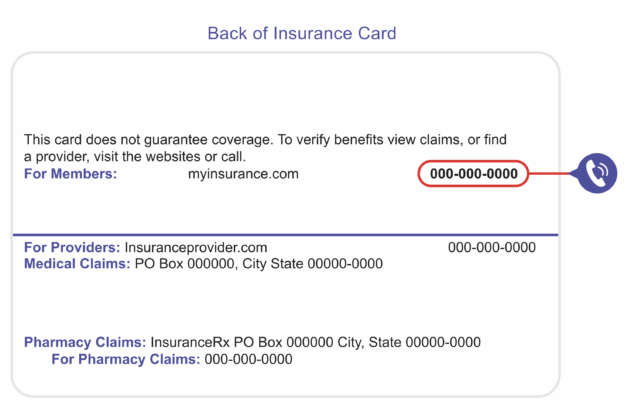
You can update your PCP by calling the phone number on the back of your health insurance card. Here’s what to expect:
Step 1: Call Your Insurance CompanyOn the back of your card, look for a number labeled:
Member Services, Customer Service, or Eligibility & Benefits.
Call the number.
When the representative answers, say:
“Hello, I would like to change my Primary Care Provider. I want to select Suvida Healthcare as my new PCP.”
Step 2: Tell Them Your InformationThey will ask you to confirm:
- Your full name
- Your home address or phone number
- Your date of birth
This helps to verify your identity.
Step 3: Tell them the Suvida Provider InformationThey will ask for the doctor you want to see and your location preference.
Step 4: Choose the Effective DateAsk for your PCP change to start on the first day of the next month, unless advised otherwise.
For example:
If you call January 15, ask for the start date to be February 1.
“Can you please make the effective date the first of the following month?”
This helps ensure you aren’t charged incorrectly.
Step 5: Write Down the Confirmation NumberBefore you hang up, ask:
“Can you please give me the confirmation number for this PCP change?”
Save it or write it down and bring it to your next appointment at Suvida.
Your Suvida team will need it if the change has not been updated in the system prior to your appointment.

I Completed My Change — What Happens Next?
Your insurance company usually updates your PCP within 48 hours.
Once the change is active:
- You will appear in the insurance eligibility system
- You will be ready for your scheduled appointment
- You can start receiving care starting on your effective date
We accept Medicare Advantage plans from:
Suvida Healthcare is a primary care group built to serve the unique needs of Medicare-eligible Hispanic adults.
Click your market below to view the Medicare Advantage plans accepted in your area: